Friday, December 3, 2010
Facebook Place vs. Foursquare
Read Along
I get asked all the time, “Melissa should I use Facebook Places or should I use Foursquare and what is the difference?”
In case you don’t already know, both Facebook Places and Foursquare are Geo-location services that allow users to “check in” at certain locations, like the supermarket, restaurants, etc. This service also allows business to create coupons or deals.
So which one is better? Well that depends on your objective.
Facebook places is now available on the iphone, Androids and the Blackberry. You simple click or touch the Facebook Places icon and “check-in”. Your location and message will be posted on your Facebook wall.
As a business owner, you can claim your business. Simply use the Facebook app to check-in at your business and there is a link at the bottom that says "Is this your business?" Click that to begin the verification process.
Once you have claimed your business, you can use Facebook Places to create “deals” for you customers.
However, there are draw backs.
First, if you are a Blackberry user, you cannot access any deals on Facebook Places. I image that this will not always be these case, but for now, it is.
Second, when you “check-in”, this information is only posted to your Facebook wall and there is no option to have it post anywhere else.
Foursquare is an app that is also available on the iphone, Andriods, and the Blackberry.
Just open the application and “check-in” to your location. The big difference between Foursquare and Facebook Places is that Foursquare gives you the option to post your where-abouts to Facebook, Twitter and to send it to your Foursquare friends.
Businesses can claim there location by simply logging on to the website, Fouraquare.com and going through the verification process.
Once you have claimed your business, you can use Foursquare to create deals and coupons for your customers. As long as you have a smart phone, you can see the deals.


Wednesday, December 1, 2010
Staying Social while Mobile
Mobile Tips
There is an app for almost anything these days and being able to stay social while mobile is critical and fun!!
One thing that bugs the heck out of people is the endless scrolling. You have to scroll through one app then you have to scroll through another app. By the end of the day your poor little index finger is cramped and tired.
Here are some tips to save your index finger and make your mobile social life a little less stressful.
Scrolling down the page to read all the updates is the easy part, but scrolling back up to the top to catch the most recent updates is a pain. Well you don’t have to scroll up.
Blackberry Users:
Just push the T on your keyboard . This will take you back to the top.
Now if you have a touch screen Blackberry you can do this one of two ways.
1. Pull out the keyboard and press T.
2. Press the menu button
• click show key board
• then hit T.
iPhone Users.
This is simple; hit the bar at the top of the screen with the battery life and viola…your back to the top.
Android:
I have ask every android user I know with a touch screen how they get to the top without scrolling, everything single one says they don’t. Sorry android users, I don’t know the answer. So if you have an answer, please share your knowledge.
Monday, November 29, 2010
Alcohol Advertising Laws and Social Media
Read along!!
I love social media and I use platforms like Facebook and Twitter to follow my Favorite bars and restaurants world wide.
I live in the Raleigh/Durham area and I have visited with a lot of restaurant and bar owners to chat about social media. I’m interested what their social media strategy is and how they are using it.
One thing I am frequently told is that they these restaurants would rather save a few bucks and have their bar-person handle their social media rather than hire a social media professional, like myself.
One big problem is that your bar person sometimes ignore the law.
Now, I am not an attorney and I’m certainly not here to give you legal advice.
I’m just saying, you could loose your liquor license if you are not careful.
Here is an excerpt from the North Carolina Alcohol Beverage Control Commission, 2S .1006 General Prohibitions.
1. Cents-off coupons or coupon offerings free alcoholic beverages shall not be used as a method of advertising.
2. No on-premise permittee or his agent shall advertise any drink promotion prohibited by Rule 2S .0232. This paragraph includes a ban on all advertisements of “2 for 1”, “buy 1 get 1 free”, “buy 1 get 1 for a penny, nickel, etc” and any other similar statement indicating that a patron must buy more than one drink.
Before you let your bar-person tweet, consider this: Is it worth it?
I encourage all restaurants and bar owners to read up on your states alcohol advertising laws.
Tuesday, November 23, 2010
Hash Tags on Twitter: How to use them and why to use them
Hash tag on Twitter. Why to use them and when to use them.
First things first, the hash tag is also known as the pound key. In the UK you say Hash and in the United States we say pound.
Part 1: Why to use the hash tag.
Now, you use the hash tag to tag your tweets. By tagging your tweets, you make them more search friendly by associating them with a particular term. So if you own a bakery you can end your tweet with #bakery.
When someone does a search for bakery, your tweet will show up in the search, it may not be at the top, but it will be there.
It is important to remember that people tag all kinds of crazy things in their tweets. There are no rules. So, there is nothing stopping a pornography twitter account from tagging there tweets with #bakery.
This can cause big problems. When someone does a search for #bakery, your tweet and a pornography tweet will show up in the same search.
Part 2: When to use the hash tag
I say, save your hashing for big events, like conferences, meetings, and trade shows. Usually, the coordinator of a large event will create a specific hash tag for the event.
Here’s an example: The hash tag for the National Restaurant Association Trade shows is #NRAshow
Because the event is so large and the hash tag is so specific, it makes it much easier for people to search for tweets relating to this topic.
You can easily create your own hash tag for an event. I would use a combination of letters and numbers that make sense.
Example: #SmithFR2010 which mean smith family reunion in 2010.
You get the picture, right?
But before you start telling everyone the hash tag for your event, do a quick search to make sure no one else is using it.
Remember…Stay Social
Monday, November 8, 2010
Social Media Management: Creating custom content for your Facebook Page in 9 easy steps.
Customizing a Welcome tab on Facebook is a great way to punch up your page and get the attention you deserve; however, unless you are comfortable with FBML, it can be quit difficult.
So here are my tips to creating a customized welcome page with out having to know any codes!
There are only 9 steps, but if you have never done this before, it can be a little time consuming.
Step 1: Photoshop. If you don’t have it, download it. You can download a 30 day free trial of Photoshop Elements 9.
Step 2: Once you have installed and opened Photoshop, go to file and click open. Find files with pictures you want to use for your custom content. As you can see, I have opened several pictures that I wish to use, including the orange/yellow background picture.
So here are my tips to creating a customized welcome page with out having to know any codes!
There are only 9 steps, but if you have never done this before, it can be a little time consuming.
Step 1: Photoshop. If you don’t have it, download it. You can download a 30 day free trial of Photoshop Elements 9.
Step 2: Once you have installed and opened Photoshop, go to file and click open. Find files with pictures you want to use for your custom content. As you can see, I have opened several pictures that I wish to use, including the orange/yellow background picture.

Step 3: Drag and drop your pictures in what ever order you like and arrange them on your background.

Step 4: Add text. On the left hand side of your screen is the text button; push it and create your text box. Write a brief description of who you are and what you do. I also created text boxes under my pictures to write our names. Save your work.

Step 5: Upload your work to Photobucket. If you don’t have a Photobucket account, create one.
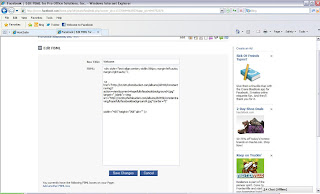
Step 6: Open Facebook and in the search bar type in Static FBML. Click Add to my page. Go to your page and click edit page and then click on applications. You should see Static FBML listed as an application, click Go to Application. Here you will have the opportunity to name your tab. Welcome, works well.

Step 7: Go back to Photobucket and click on the image you wish to use as your custom content. On the left side of the screen you will see a box that says: Share this Image. Click on and copy the HTML Code.

Step 8: Time to add dimensions to your code. For now, paste your code into a word document. At the beginning of the code add this:
div style="TEXT-ALIGN: center; WIDTH: 596px; MARGIN-LEFT: auto; MARGIN-RIGHT: auto"
Add: <
in front of div
add: >
at the end of auto". I can't do this because it centers all my text.
Now look at the last line of code and delete the piece that says:
alt="Photobucket">
Now add this piece of code to the end:
width="455" height="768" alt="" />
If these dimensions don’t work for you, change them around.
Step 9: In the Static FBML application, copy and paste your code into the box. And hit save.

Friday, November 5, 2010
Social media management:-Twitter: Are you Human?
I know people will tell you that Twitter is all about tweeting links to news articles and blogs that are relevant to your industry. I say, be careful with this approach. Yes, Twitter is excellent for tweeting articles and blog posts that you and your readers may find interesting; however, if this is all you do how can anyone tell if you are human?
Human? Yes, are you a real person or are you a bot (essentially, spam)? I research people and company’s all day everyday as part of my job and I run into so many people and businesses that use twitter to simply tweet links with no engagement.
When I say engagement, I mean asking your fan base questions, encouraging your fan base to ask you questions, and leave their comments and opinions.
When I look at a Twitter page, if I simply see links being tweeted with no engagement I will not follow them, simply because I do not want someone spamming me.
Tips on being Human on Twitter:
1. Ask questions. Not all questions have to be relevant to your industry. Personally, I love to ask people what they did over the weekend.
2. If you are going to tweet links, use the characters available to create your own title for the link, make it more personal. I like to add comments in parenthesis. (This is such a fun article). Also, take into account that people with smart phone will check their Twitter accounts using an app on their phones. This makes reading links to articles difficult.
3. I don’t care what anyone says, I love to see pictures on Twitter. I encourage everyone to upload pictures to your twitter post. I usually upload pictures of places, people, events, etc that my businesses is involved in. Pictures add a personal touch that you can’t get through words.
4. Tweet interesting content and don’t be afraid to get personal. I love it when businesses tell me that John Doe the barman has a birthday today.
Happy Tweeting!!!

Human? Yes, are you a real person or are you a bot (essentially, spam)? I research people and company’s all day everyday as part of my job and I run into so many people and businesses that use twitter to simply tweet links with no engagement.
When I say engagement, I mean asking your fan base questions, encouraging your fan base to ask you questions, and leave their comments and opinions.
When I look at a Twitter page, if I simply see links being tweeted with no engagement I will not follow them, simply because I do not want someone spamming me.
Tips on being Human on Twitter:
1. Ask questions. Not all questions have to be relevant to your industry. Personally, I love to ask people what they did over the weekend.
2. If you are going to tweet links, use the characters available to create your own title for the link, make it more personal. I like to add comments in parenthesis. (This is such a fun article). Also, take into account that people with smart phone will check their Twitter accounts using an app on their phones. This makes reading links to articles difficult.
3. I don’t care what anyone says, I love to see pictures on Twitter. I encourage everyone to upload pictures to your twitter post. I usually upload pictures of places, people, events, etc that my businesses is involved in. Pictures add a personal touch that you can’t get through words.
4. Tweet interesting content and don’t be afraid to get personal. I love it when businesses tell me that John Doe the barman has a birthday today.
Happy Tweeting!!!

Monday, November 1, 2010
Black Friday, there's an app for that.
The holidays are approaching fast! This season we will see a big surge in the number of retailers using social media, blogs, geo-location based services and apps.
Before you shop check out Facebook, Twitter, YouTube and blogs pages of your favorite stores.
When you are on the go, get the apps (iphone only)
Black Friday App By dealnews.com, Inc (Free) Click Here.
This app shows and confirms rumored deals. Black Friday deals that are no longer available are removed form the list.
Most large retailers now have an app available. I would consider also downloading these.
Happy Shopping!!!
Before you shop check out Facebook, Twitter, YouTube and blogs pages of your favorite stores.
When you are on the go, get the apps (iphone only)
Black Friday App By dealnews.com, Inc (Free) Click Here.
This app shows and confirms rumored deals. Black Friday deals that are no longer available are removed form the list.
Most large retailers now have an app available. I would consider also downloading these.
Happy Shopping!!!
Subscribe to:
Posts (Atom)